Redirect visitors
A plain stack of buttons sends attention somewhere else. If your old website no longer reflects your work, sharing it can feel uncomfortable.

Link in bio
A link-in-bio page is one destination for the links, information and actions you share from a social profile. Your link in bio should do more than list links. NciteMe gives you a connected Smart Bio with interactive content, QR codes, contact tools, bookings, and analytics.
Beyond link in bio
Keep the simplicity of one URL, then add the useful parts of a real website and connect what happens next.
A plain stack of buttons sends attention somewhere else. If your old website no longer reflects your work, sharing it can feel uncomfortable.
Give every visitor the right content and a useful next step.
Measure first-party activity across pages, links, forms, and QR codes.
If you only need a list of links, a simple link page may be enough. Choose NciteMe when visitors also need your services, photos, hours, or a way to contact you.
Want your page to carry your brand instead of advertising someone else’s? Compare plans for branding removal and custom-domain support. Use separate pages for different roles or audiences, all managed in one account.
Keep the one link. Give visitors more to do.
Four ways to start
Use the guided wizard, open the live editor, start from a finished template, or have Claude or ChatGPT interview you and return a preview.
Answer a few questions about your audience and what visitors should do. NciteMe assembles the first page, then you can change anything.
Start this way →Open a blank canvas and add blocks, colors, and photos while the page updates in front of you.
Start this way →Browse finished pages in the showcase, open one you like, and make it yours.
Start this way →Choose Claude or ChatGPT. The setup page shows that assistant's own settings and connector address. Add it there, start a new chat, and claim the preview. Do not paste the connector address into the chat.
See how to connect →What it means
People use it on Instagram, TikTok, YouTube, and other profiles so visitors can reach your links, offers, and contact options from one place.
Where a list stops
A traditional link list cannot show a menu, take a booking, save a contact, or tell you which QR on a sign was used. A Smart Bio can.
What NciteMe adds
Interactive blocks, managed short links, QR codes, and first-party analytics live in one workspace. Free covers a simple bio. Starter adds business tools, Pro adds advanced proof and kit capabilities, and Business adds Team.
YOUR WEBSITE, REBUILT FOR HOW PEOPLE CONNECT TODAY
A NciteMe Smart Bio gives you the professional presence of a modern website while making it easier for visitors to take action from the device already in their hands.
They can call, email or message you, open directions in their preferred map, save your contact information, book an appointment, complete a form, view products and services, or share your page—all directly from their phone or computer.
Connect your custom domain, update your site from your phone, and see which links, QR codes, social platforms and campaigns bring people to you.
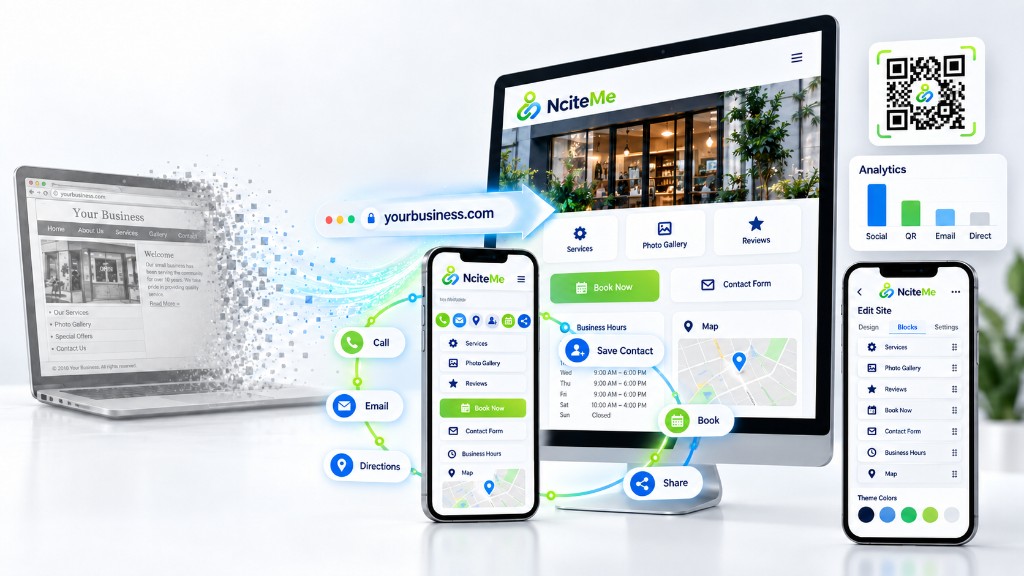
Traditional websites were built mainly to be viewed. Your Smart Bio is built to help visitors act.
Your Smart Bio also adapts into a polished tablet or two-column desktop website—so visitors receive the right experience on every screen.
Built around what you do
A creator page should not look like a restaurant page. NciteMe adapts around the work.
These are fictional examples, not businesses taking reservations. Open the live page to see the real layout.


Device mockups are illustrations of these pages. Browse more examples in the showcase.
See how it works
Add content, adjust your layout, and see how your page comes together.
Easily update your profile with the live editor at any time.
Build your smart page →Choose your header image, colors, and content. Your page adapts from phone to desktop using the same content and URL.
Explore design controls · See all four ways to create a page
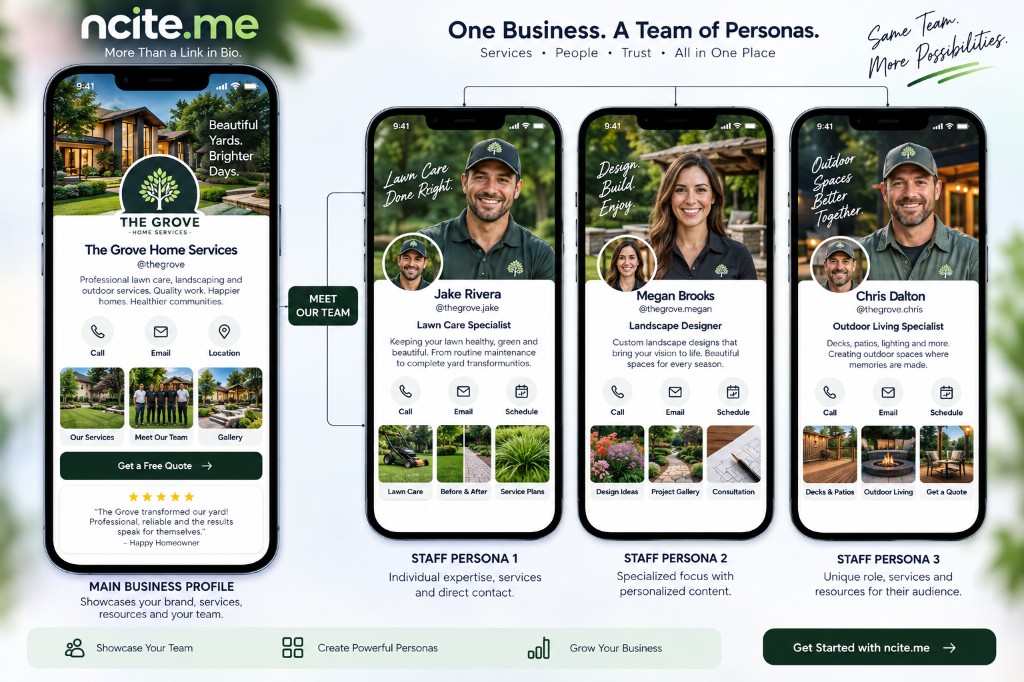
ONE PROFILE. MULTIPLE PERSONAS.
Start with one main profile, then create focused personas for each audience you serve—or each person on your team. Same account. Clear paths. The right page for whoever shows up.
Bob can introduce himself at @bob, share listings through @bob.realtor, connect with gamers at @bob.gaming, and promote home services through @bob.handyman—all from one Ncite account.
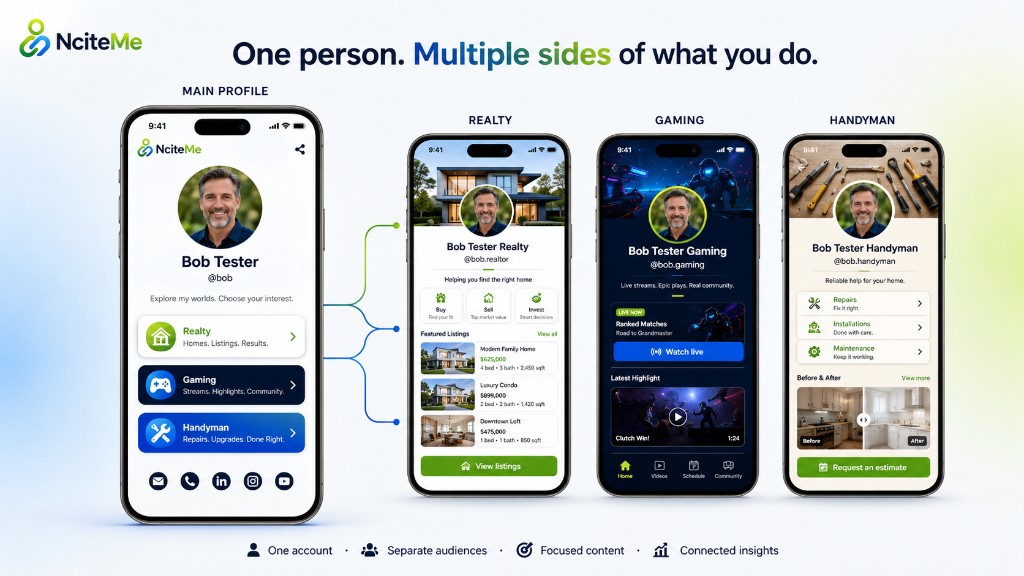
Your primary profile introduces the brand—or you—and gives visitors a clear path to the page that matches why they showed up.
Give each audience or teammate their own name, design, content blocks, contact options, Smart Links, QR code, and call to action.
Split by role, service line, or team member—so customers, followers, and clients land on the experience built for them.
See how each persona performs while keeping traffic, clicks, leads, and engagement connected inside one account.
One profile. Many personas—for every audience you serve, or every teammate you showcase.
One page. Every screen.
Keep it fast and focused on mobile. On wider screens, the same profile expands into a richer two-column mini-site—using the same content and URL.
Designed to feel like yours
Shape the profile around your brand and your content. Set the hero image and the bio card that sits over it on mobile, choose colors and typography, and arrange your portfolio and content blocks. Easily update your profile with the live editor at any time.
Resize the header, choose the image focus, and control the fade into the page.
Arrange a portfolio, services, and other content blocks in the order visitors need them. Portfolio and most business blocks start on Starter.
Refine themes, typography, icons, spacing, and block treatments without rebuilding the page.

40+ content blocks
Not just buttons. Real website functionality.
Ncite ships with more than 40 content blocks—video, galleries, products, services, menus, hours, events, reviews, booking, forms, polls, downloads, newsletters, FAQs, and professional kits. There's a block for nearly everything you need, so your Smart Bio can work like a full-featured website. Which blocks appear on the public page depends on the plan.
The lists beside the examples are the broader block catalog. They are not a claim that every block is included on Free. A simple bio stays on Free. Business tools such as hours, events, and portfolio start on Starter. Team is on Business.

Know which sign, email, or post brought them in
Sharing one connected profile is only the beginning. Ncite shows you how people discover your Smart Bio, which links and content earn their attention, and which visits become leads, bookings, contact saves, downloads, and inquiries.
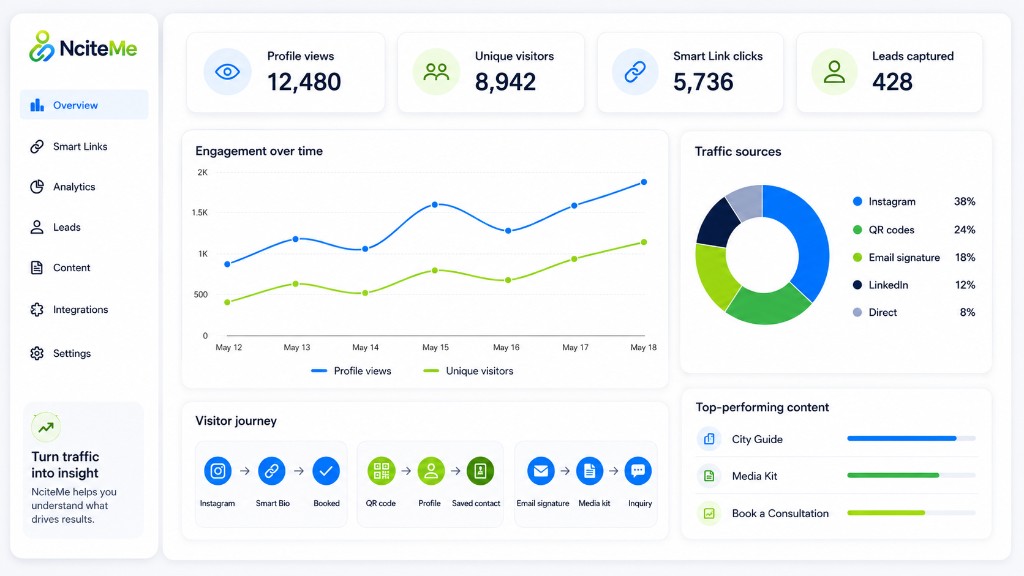
See whether visitors came from Instagram, LinkedIn, an email signature, a QR code, a campaign, or another tracked source.
Track profile views, unique visitors, Smart Link clicks, social taps, contact saves, follows, downloads, and form activity.
Compare your links, content blocks, services, products, listings, events, media kits, and calls to action to learn what people respond to.
Connect the path from traffic source to profile visit to meaningful action—not just another disconnected click count.
A plain link-in-bio tells you someone clicked. Ncite helps you understand why they arrived, what interested them, and what they did next.
One connected toolkit
A polished profile for who you are and what you do.
Links, media, services, products, events, and proof.
Forms, polls, funnels, offers, downloads, and booking.
First-party activity across pages, links, and QR codes.
Build around what you need
Start with a clean Smart Bio, then add the blocks that make your page genuinely useful. Keep it simple—or build a complete mini-site.
Build my page →Text, video, portfolio, gallery, featured content, products.
CTA, booking, offer, waitlist, newsletter, download, lead form.
Reviews, transformations, FAQs, media kits, press, social proof.
Services, menus, hours, maps, teams, amenities, and events.
Profile QR, email signature, and tracked social links—built into every profile.
Updates, polls, countdowns, collaboration, and follow activity.
Send visitors directly—or collect a lead, ask a question, or guide them through a focused funnel first.
A smarter next step
Update campaigns without changing the URL in your bio or reprinting the QR code. Every route stays connected to the same analytics.
Explore Smart Links →Be ready when they ask for more
Give sponsors, journalists, partners, and prospective clients a professional page with the information they need.
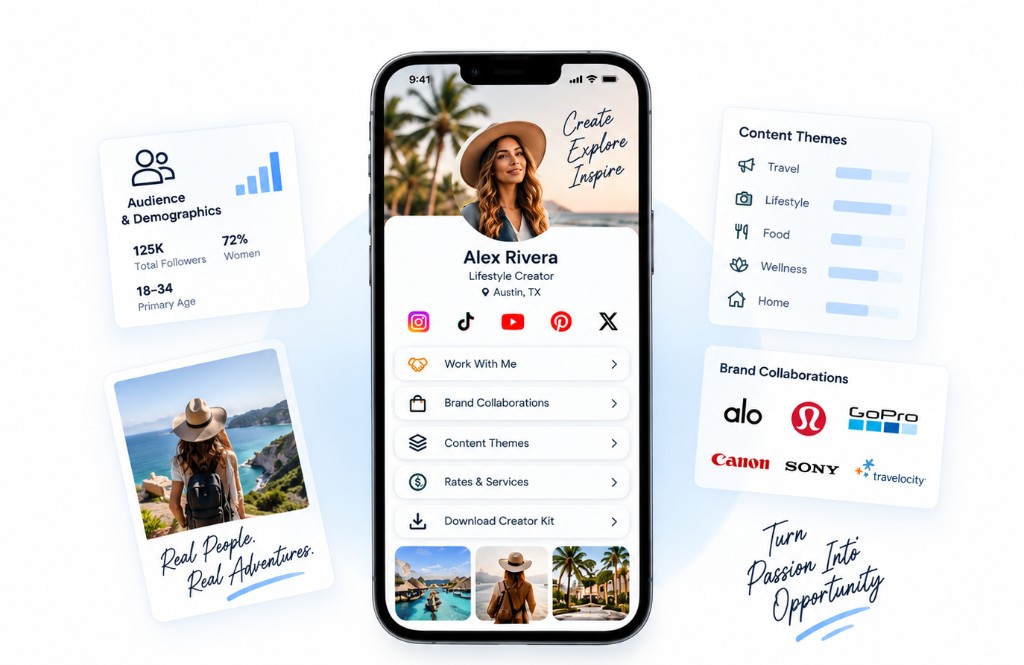 Creator kit
Work samples, content themes, collaborations, deliverables, and contact. You choose what to show.
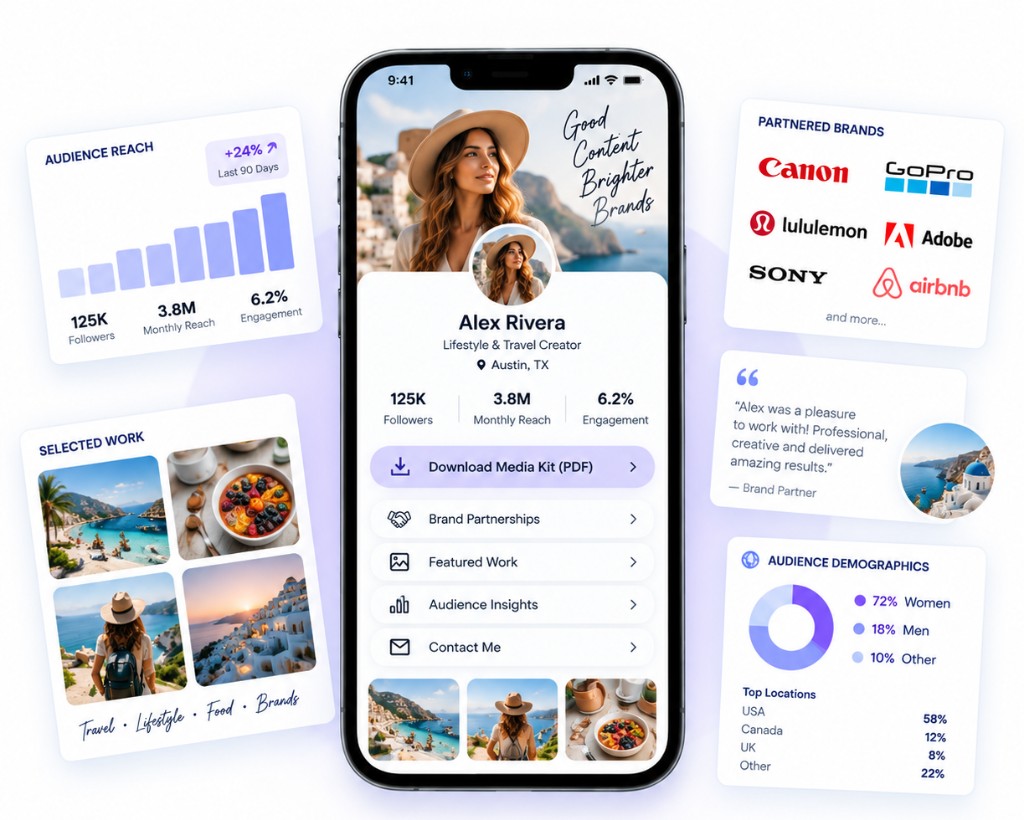 Media kit
Selected work, testimonials, and first-party results you choose to show. Ncite does not import verified social audience numbers.
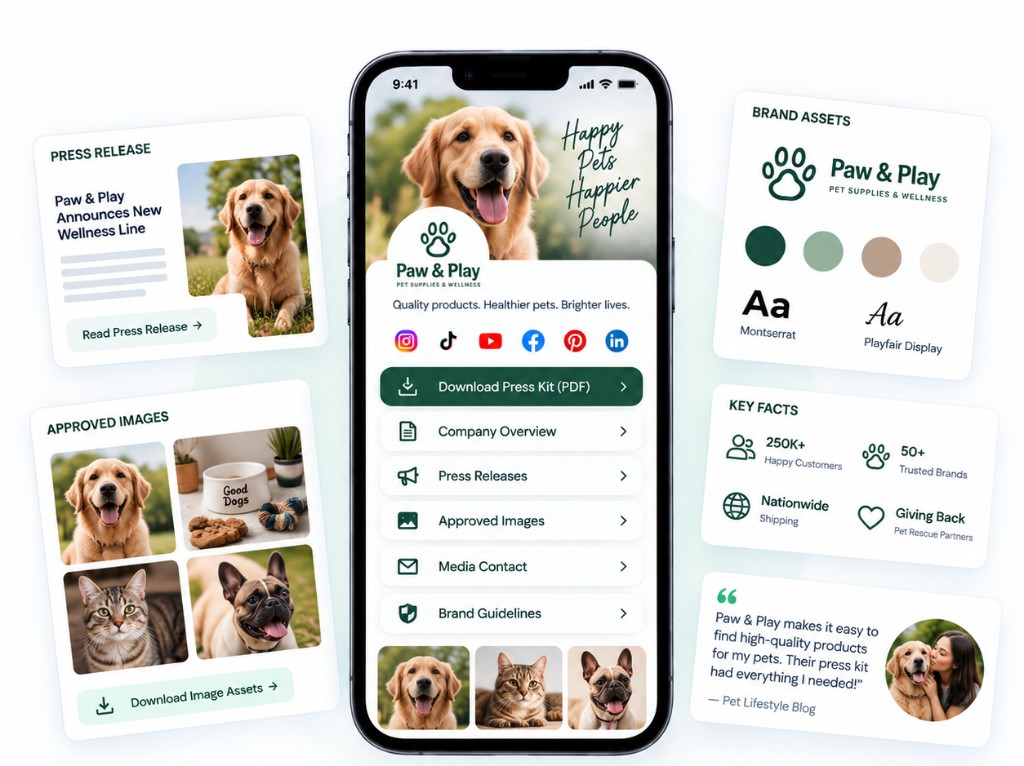 Press kit
Bio, approved images, facts, press mentions, downloads, and inquiry.
Keep your domain. Update from your phone.
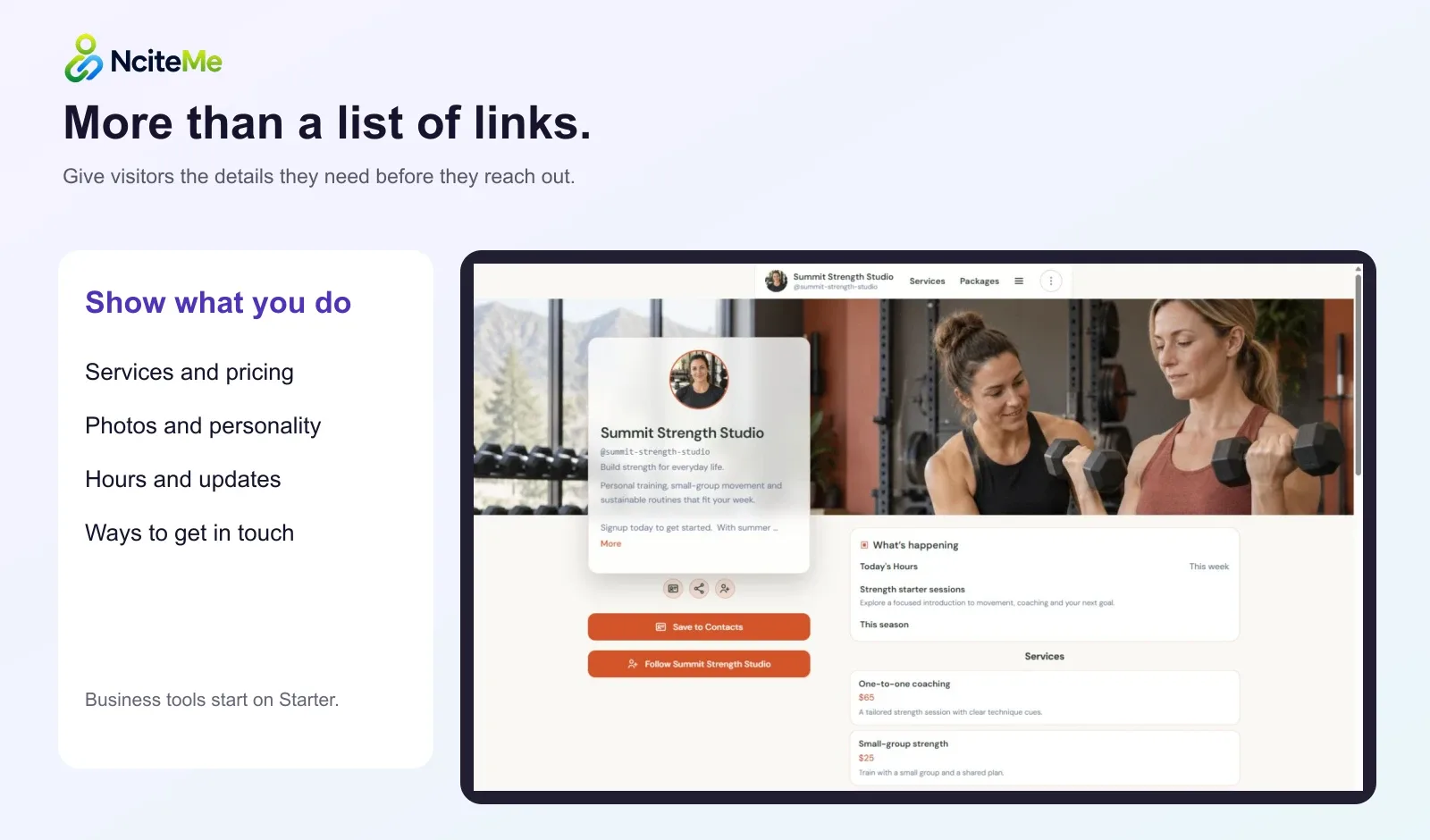
Publish services, menus, prices, hours, maps, events, reviews, offers, booking, and lead capture. Update the page when the business changes—not when a developer has time.
Menu · hours · events · directions
Consultations · services · lead capture
Offers · updates · reviews · contact
BUILD YOURS NOW
Step through the guided profile wizard and watch Ncite create a page around what you do. Or jump directly into the live editor and explore the full experience yourself—no design or coding experience required.
Tell us who you are, who you want to reach, and what visitors should be able to do. We’ll recommend the right layout, content blocks, and next steps.
Build my page →See your result before creating an account.
Click directly on a working profile to change its content, design, layout, images, blocks, and responsive appearance.
Try the live editor →Interactive demo—nothing you change affects a real page.
Build it. Preview it. Make it yours. Publish when you’re ready.
Start simple. Add what you need.
Preview your page free. Inquiry forms are included on Starter. A free plan can publish a basic page, then you can add tools as you grow.
Try a page for your links and contact details.
Free — no subscription required.
Add business tools to your page.
$6.99 billed monthly.
Connect lead workflows and build professional kits.
$14.99 billed monthly.
Manage more pages with your team.
$29.99 billed monthly.
Free accounts require no credit card. Paid upgrades are processed by Stripe. How we handle your data · Billing terms
14-day refund on your first paid subscription. Renewals excluded. Refund terms and how to request.
* Unlimited QR means no fixed creation cap. Account usage notices can still apply; see Billing for your account’s usage limits.
Questions, answered
Start with one page and direct links. Add the rest only when it helps.
Photos of your work, your services, hours, a map, booking links, and social profile links. Visitors get one link that works on a phone and on a desktop. Separate pages can cover a different business, role, or audience.
For a photographer, trainer, or food truck, one NciteMe page can show the work, list the services, and give visitors a way to inquire. It can also sit alongside a site you already have.
Yes. Open the live editor and change photos, services, and contact details whenever you want. The public link stays the same.
Preview your page free. A free plan can publish a basic page. Inquiry forms are included on Starter. Compare plans for branding removal, extra pages, and other tools.
Request a full refund through Support within 14 days of the initial payment for your first paid subscription. Renewals are excluded from this guarantee. After that window, cancel to stop the next renewal and keep access through the paid period; unused time is not refunded simply because you change your mind. Billing errors and legally required refunds are handled separately. Refund policy.
Bring the links from your existing public bio page—either on the Try page or by asking Claude or ChatGPT through the NciteMe connector—review what we found, and add them to your NciteMe draft. Some services block automated reading; you can paste your links instead. Your existing design and analytics history are not imported.
You retain ownership of the content you submit. NciteMe hosts and displays it under the Terms. Keep your original photos and copy so you can reuse them elsewhere. Hosting and export limits.
You can add your NciteMe URL to a social bio where links are allowed. Each platform controls its own link checks, so we cannot guarantee it will never flag or restrict a URL.
A persona is a separate page for a different business, role, or audience, managed from the same NciteMe account.
Your page. Your links. Your next step.
Show your work, collect inquiries, and see what works.